Virtual Receptionist System: The Complete 2026 Guide
A virtual receptionist system answers and routes calls 24/7 without a front desk hire. See how it works, what it costs, and how to set one up.
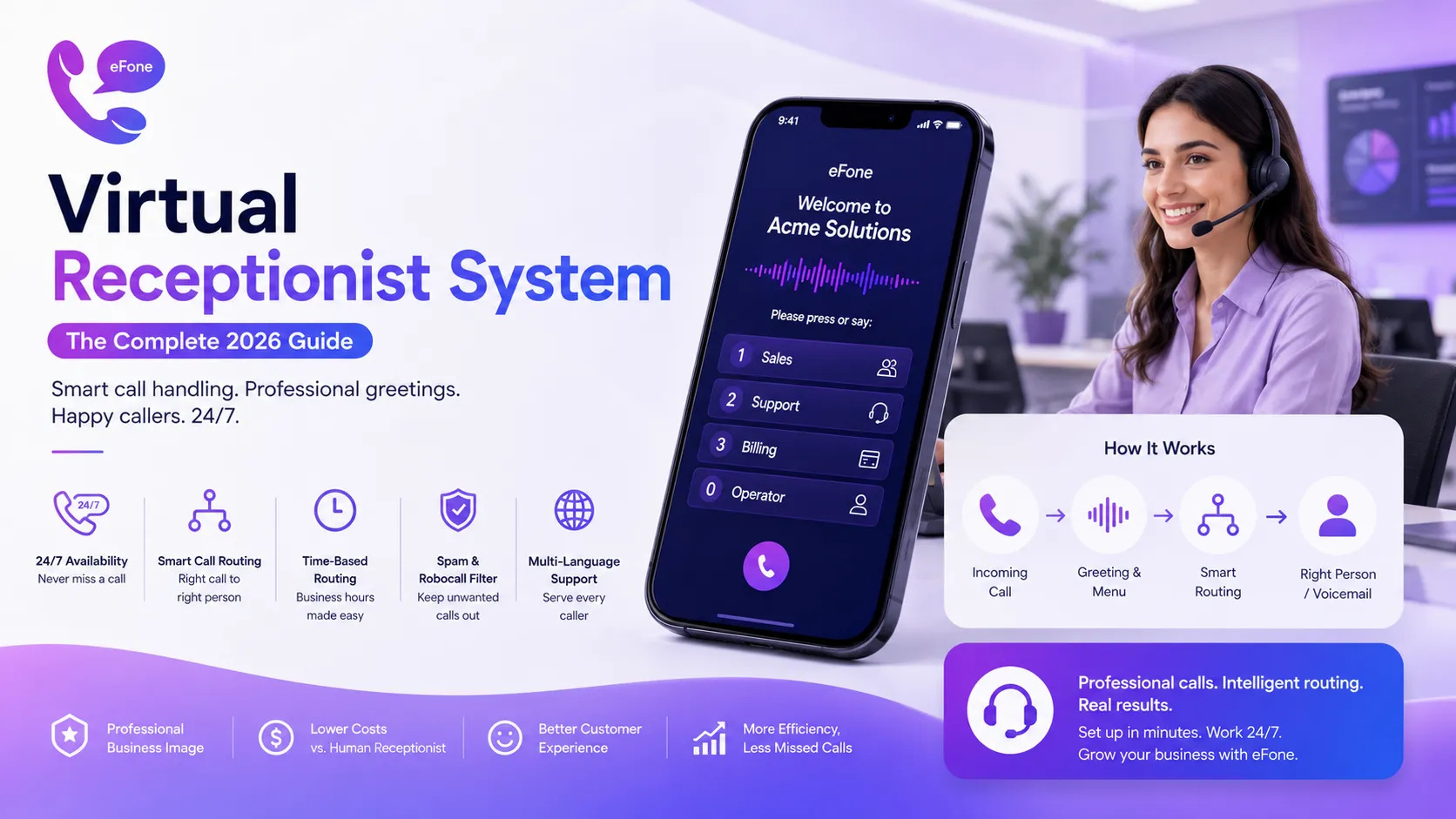
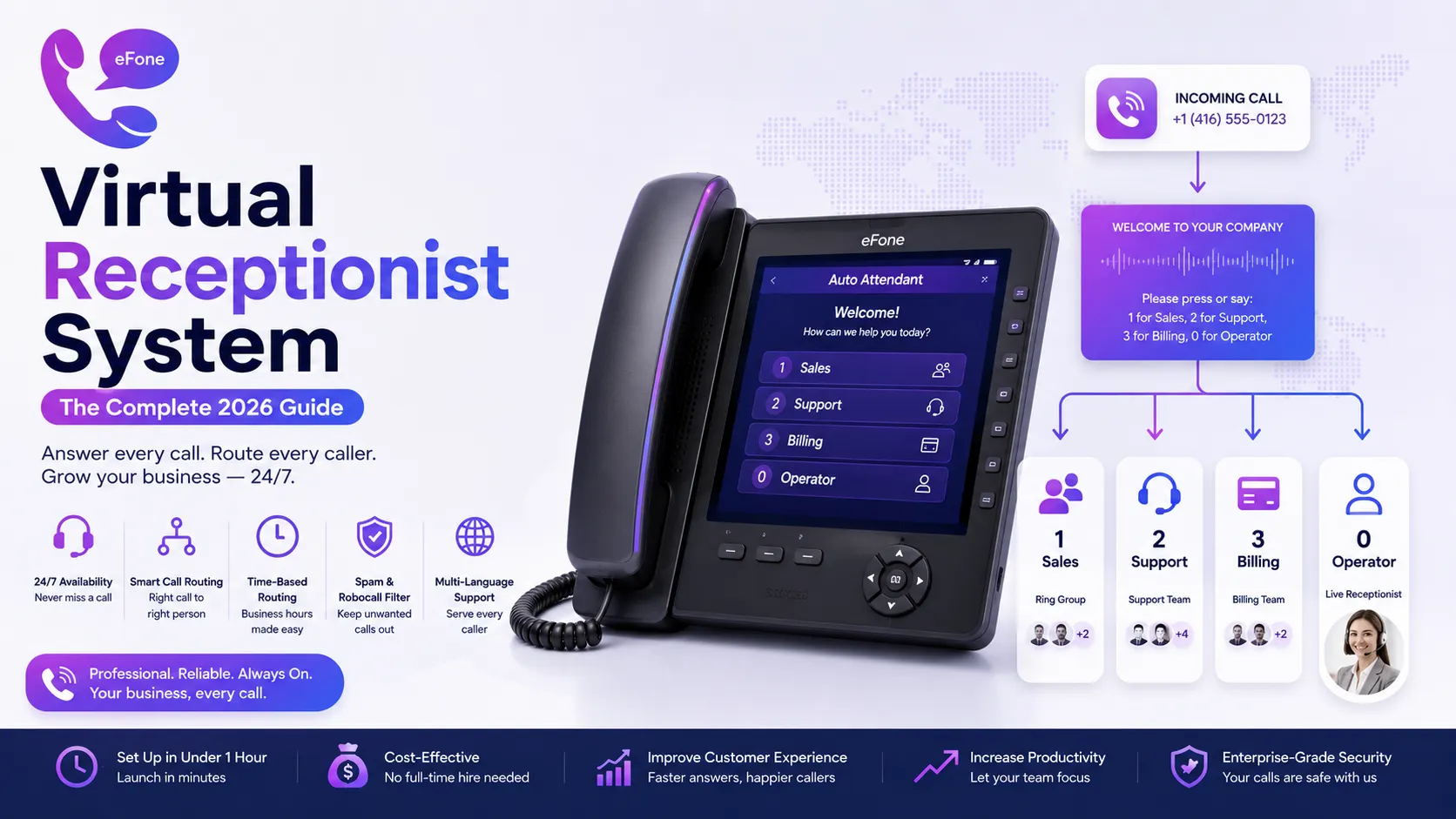
A virtual receptionist system answers incoming calls with a professional greeting, gives callers a simple menu of options, and routes them to the right person, department, or voicemail, automatically, 24/7, without a front-desk hire. Most businesses set one up in under an hour and see an immediate drop in missed calls. This guide covers how virtual receptionist systems work, what they cost, and how to design a call flow that helps rather than frustrates callers.
What a Virtual Receptionist System Actually Does
At its core, a virtual receptionist, also called an auto attendant, plays a recorded greeting and offers callers a menu: press or say 1 for sales, 2 for support, 0 for the operator, and so on. More advanced systems go further, using speech recognition to route based on what a caller says rather than which button they press, adjusting call handling by time of day, and even filtering out robocalls that can't respond to menu prompts.
Core Features to Look For
Multi-level menus
Simple systems offer one menu; more complex organizations often need submenus, press 2 for support, then 1 for billing or 2 for technical issues, to route callers precisely without overwhelming them upfront.
Time-based routing
Calls during business hours can route to a live receptionist or team, while after-hours calls automatically go to voicemail or an on-call representative, with zero manual switching required.
Custom greetings and business info playback
Beyond routing, an auto attendant can play back business hours, locations, or answers to frequently asked questions, cutting down the number of calls that need a live person at all.
Spam and robocall filtering
Automated robocalls generally can't respond to menu prompts, which means a virtual receptionist naturally filters out a meaningful share of unwanted calls before they reach your team.
Priority routing
Some systems let you flag VIP callers or known numbers for faster routing, ensuring high-value clients don't wait in the same queue as a first-time caller.
Multi-language support
Offering menu options in multiple languages helps businesses serve diverse customer bases without needing bilingual staff available at all times.
Virtual Receptionist vs. a Human Receptionist
Most growing businesses don't have to choose one exclusively, a common setup uses a virtual receptionist to handle after-hours calls, filter spam, and route simple requests, while a live person handles more complex conversations during business hours.
| Factor | Virtual Receptionist | Human Receptionist |
|---|---|---|
| Availability | 24/7, including nights and holidays | Limited to working hours |
| Cost | Included in most VoIP plans or low add-on cost | Full salary and benefits |
| Consistency | Identical greeting and routing every time | Varies by mood, training, day |
| Best for | Routing, FAQs, after-hours coverage | Complex, high-touch conversations |
What a Virtual Receptionist System Costs
Auto attendant functionality is included standard in most modern business VoIP plans, typically without a separate line-item cost. More advanced versions, with AI-driven natural language routing or appointment-booking capability, sometimes come as part of a higher plan tier, generally adding $5–$20 per user per month over a basic plan. Compared to a full-time receptionist salary, even the higher end of this range is a small fraction of the cost.
How to Set Up a Virtual Receptionist System
- Map your call flow before touching any settings, decide who or what each menu option should route to.
- Keep the main menu short, three to four options is usually enough; long menus are one of the most common sources of caller frustration.
- Record a clear, professional greeting, or use a text-to-speech option if you'd rather not record it yourself.
- Set business hours and after-hours routing separately, so callers outside your hours get an appropriate message rather than silence.
- Test every menu option yourself by calling in before rolling it out to customers.
- Review call routing data after the first few weeks and adjust based on where callers are actually going.
Common Mistakes to Avoid
- Building a menu with too many options or too many submenu layers, which causes callers to hang up before reaching anyone.
- Forgetting to update the greeting for holidays or temporary schedule changes.
- Not offering a way to reach a live person, even a 'press 0 for the operator' option matters for callers who don't fit neatly into the menu.
- Using a robotic or unclear recorded voice, which can make a growing business sound smaller and less professional than intended.
- Never testing the caller experience end-to-end after initial setup.
Where eFone Fits
eFone includes auto-attendant and virtual receptionist functionality as a standard feature rather than a paid add-on, with time-based routing and custom greetings you can set up directly from the admin dashboard. You can see what's included on the efone pricing page.
If you're setting this up alongside a broader phone system rollout, our guide to how to set up VoIP walks through the full process, and our VoIP for call centers guide covers routing at higher call volumes.
The Bottom Line
A virtual receptionist system is one of the fastest, lowest-cost upgrades a growing business can make, cutting missed calls, filtering spam, and giving every caller a consistent, professional first impression around the clock. The setup takes an hour; the payoff compounds every day after. See how eFone's virtual receptionist works as part of every plan.
Frequently Asked Questions
What is a virtual receptionist system?+
A virtual receptionist system, also called an auto attendant, automatically answers incoming calls with a greeting, offers a menu of routing options, and connects callers to the right person, department, or voicemail without a live operator.
How much does a virtual receptionist system cost?+
Basic auto attendant functionality is typically included in standard business VoIP plans at no extra cost. More advanced AI-driven versions can add roughly $5–$20 per user per month.
Is a virtual receptionist the same as an auto attendant?+
Yes, the terms are generally used interchangeably, though 'virtual receptionist' sometimes also refers to a human answering service, so it's worth clarifying which one a provider means.
Can a virtual receptionist replace a human receptionist entirely?+
It depends on your business. Many companies use a virtual receptionist for after-hours coverage, spam filtering, and simple routing, while keeping a live person for complex, high-touch conversations during business hours.
How long does it take to set up a virtual receptionist system?+
Basic setup with a single-level menu can be completed in under an hour. More complex multi-level menus with time-based routing typically take a few hours to plan and configure properly.
Can a virtual receptionist filter out spam calls?+
Yes. Because automated robocalls generally can't respond to menu prompts, a virtual receptionist naturally screens out a meaningful share of unwanted calls before they reach your team.
Can I change the greeting for holidays or special hours?+
Yes, most systems allow you to schedule alternate greetings and routing for holidays, special events, or temporary schedule changes without disrupting your standard setup.
Does a virtual receptionist support multiple languages?+
Many modern systems support multi-language menu options, letting callers choose their preferred language before being routed, which helps serve diverse customer bases.
What happens if a caller doesn't select a menu option?+
Most systems can be configured to route silent or unresponsive callers to a default option, such as the main line or voicemail, after a set number of seconds.
Can a virtual receptionist book appointments?+
Some advanced, AI-driven virtual receptionist systems can handle basic appointment scheduling, though this typically requires a higher plan tier or a dedicated scheduling integration.
How many menu options should a virtual receptionist have?+
Three to four options at the top level is generally recommended. Longer menus increase the chance callers hang up before reaching the option they need.
Can remote and multi-location teams use the same virtual receptionist?+
Yes. Cloud-based virtual receptionist systems can route calls to any extension regardless of physical location, making them well suited to remote and multi-location teams.
Is a virtual receptionist system difficult to maintain?+
No. Once the initial call flow is set up, most businesses only need to update greetings occasionally and review routing data periodically to catch any mismatches.
Do virtual receptionist systems work with mobile phones?+
Yes. Calls routed by a virtual receptionist can be sent to mobile apps or forwarded to cell phones, so staff don't need to be at a desk to receive routed calls.
What's the biggest mistake businesses make with virtual receptionist setup?+
Building menus with too many options or layers. Testing the caller experience yourself before launch is the simplest way to catch a confusing call flow before customers do.
Ready to get your number?
Set up a business phone and help desk on one account, or grab a personal line to call home — usually in minutes.
Get started