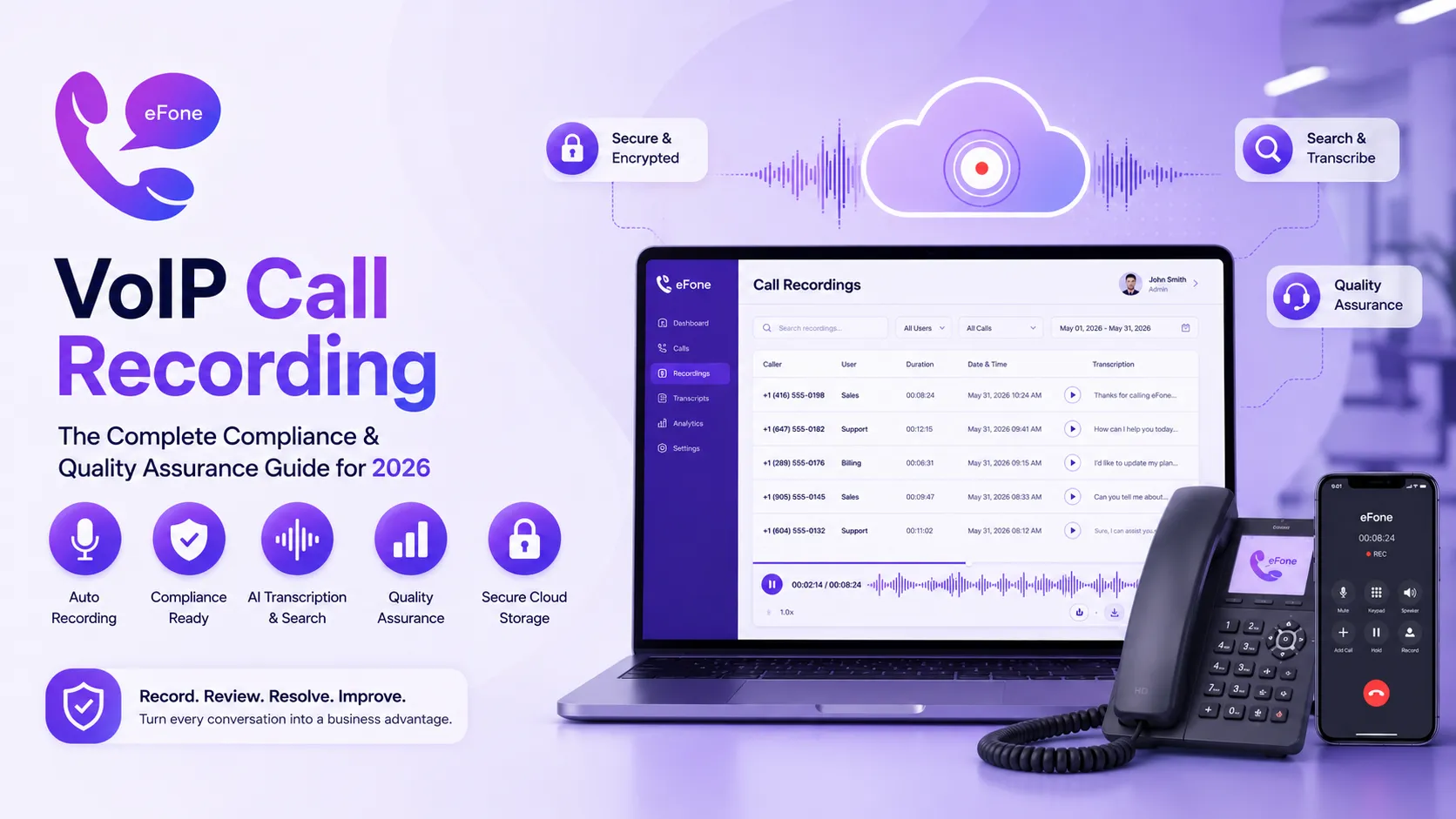
VoIP Call Recording: The Complete Compliance and Quality Assurance Guide for 2026
VoIP call recording made simple. Automatic recording, AI transcription, compliance-ready storage. Included free with every eFone plan. Try it today.
Every business conversation carries information worth protecting, pricing commitments, customer complaints, verbal agreements, and training moments that shape how your team performs. VoIP call recording captures every one of those conversations automatically, turning spoken words into a searchable, reviewable business asset. Yet many companies still treat VoIP call recording as an afterthought, bolted onto their phone system as an expensive add-on rather than a core capability.
This guide breaks down everything you need to know about VoIP call recording in 2026: how it works, why it matters for compliance and training, what legal requirements apply across Canada and the US, and how to choose a provider where VoIP call recording is included, not charged separately. Whether you run a sales team, a customer support desk, or a regulated business that must document every conversation, VoIP call recording is no longer optional. It is foundational infrastructure.
What Is VoIP Call Recording and How Does It Work?
VoIP call recording is the automatic capture of phone conversations made through a cloud-based phone system. Unlike traditional call recording, which often required separate hardware boxes wired into analog phone lines, VoIP call recording happens natively in the cloud, no extra equipment, no manual activation, no complicated setup.
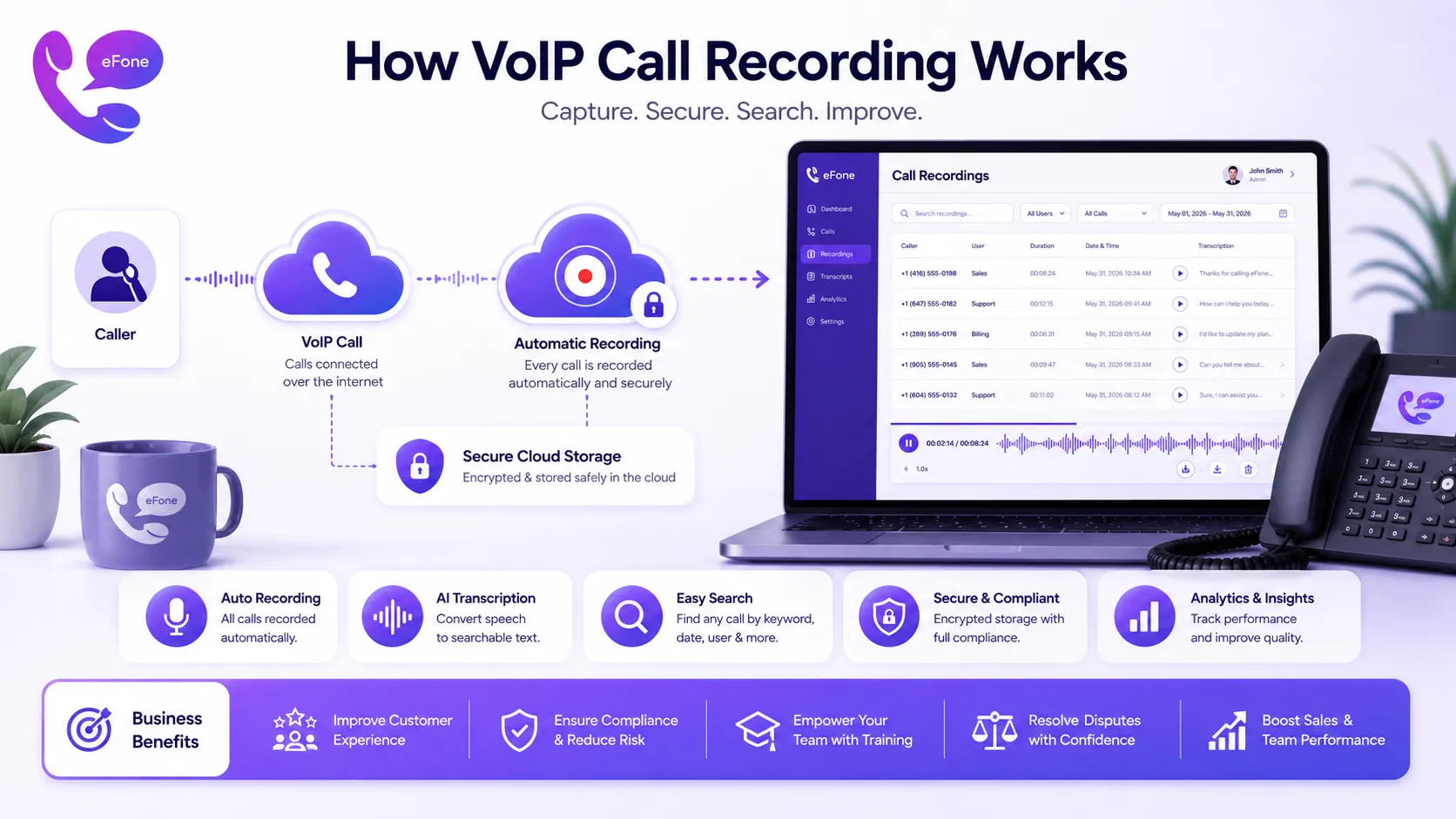
When your business uses a VoIP platform like eFone, every call placed or received through the system can be captured automatically. The VoIP call recording process works like this: the call audio stream is captured at the server level, encrypted, stored securely in the cloud, and made available through your dashboard, searchable by date, caller, extension, or keyword if AI transcription is enabled.
Here is what separates modern VoIP call recording from legacy analog recording systems:
- No hardware required: VoIP call recording runs entirely in the cloud infrastructure
- Automatic activation: every call is recorded by default, no manual button presses
- Searchable transcripts: AI converts VoIP call recording audio into readable, searchable text
- Instant access: recordings appear in your dashboard within seconds of call completion
- Secure storage: encrypted at rest and in transit, meeting compliance standards
- Scalable: VoIP call recording captures every extension without per-line hardware costs
eFone includes VoIP call recording as a standard feature across every business plan, not a paid add-on. Explore the complete feature breakdown to see exactly how recording integrates with the rest of your communication stack.
Why VoIP Call Recording Matters: Five Core Business Use Cases
Companies that implement VoIP call recording rarely use it for just one purpose. The real value of VoIP call recording compounds across multiple departments and use cases simultaneously. Here are the five most common reasons businesses depend on VoIP call recording:
1. Call Recording for Quality Assurance
Sales and support managers use call recording for quality assurance to coach team members, identify training gaps, and ensure brand-consistent messaging. Instead of relying on second-hand reports, managers listen to actual conversations. Call recording for quality assurance turns every customer interaction into a coaching opportunity, without requiring a manager to sit in on live calls.
2. Dispute Resolution
When a customer disputes what was said, pricing, refund terms, delivery dates, VoIP call recording provides an objective record. Instead of a he-said-she-said argument, your team plays back the exact conversation. This single use case alone often justifies the investment in automatic call recording for businesses handling high transaction volumes.
3. Regulatory and Legal Compliance
Industries including healthcare, financial services, insurance, and legal services often require documented call recording compliance. VoIP call recording with secure, timestamped storage helps businesses meet audit requirements and demonstrate accountability during regulatory reviews.
4. Sales Coaching and Onboarding
New sales hires ramp up faster when they can listen to recordings of top performers. Business phone call recording becomes a training library for real conversations, real objections, real closes, far more valuable than scripted role-play exercises.
5. Order and Commitment Verification
For businesses that take orders, bookings, or verbal agreements by phone, VoIP call recording creates a verifiable record of what was promised. This protects both the business and the customer when details need to be confirmed after the call ends.
Call Recording Compliance: What Canadian and US Businesses Must Know
Call recording compliance is the single most misunderstood part of implementing VoIP call recording. Recording a phone call without proper consent can create legal liability, even if your intent is purely for training or quality purposes. Understanding call recording compliance before you turn on VoIP call recording protects your business from costly mistakes.
Here is a general overview of call recording compliance considerations (always consult legal counsel for your specific jurisdiction):
| Jurisdiction | General Consent Rule | What This Means for VoIP Call Recording |
|---|---|---|
| Canada (Federal) | One-party consent generally permitted | At least one party (often the business) must consent to call recording compliance |
| Most US States | One-party consent states | Business can enable automatic call recording if one party consents |
| Two-Party Consent US States | All parties must consent (e.g., California) | A recorded line notification is required before VoIP call recording begins |
| Regulated Industries | Sector-specific rules (finance, healthcare) | Call recording compliance often mandated by regulator, not optional |
Best practice for call recording compliance regardless of jurisdiction: include an automated announcement at the start of calls ("This call may be recorded for quality and training purposes") through your auto-attendant. eFone supports this directly, configure your call recording compliance announcement in the dashboard, and every business phone call recording begins with proper notice.
This guide provides general information and is not legal advice. Always confirm call recording compliance requirements with qualified legal counsel familiar with your industry and jurisdiction before enabling automatic call recording.
Automatic Call Recording: How It Works Inside eFone
Automatic call recording removes the burden of remembering to start and stop recordings manually. With eFone, automatic call recording is enabled at the account, extension, or individual user level, giving you full control over which calls are captured.
Here is how automatic call recording functions inside the eFone platform:
1. Enable automatic call recording in your dashboard
Toggle automatic call recording on for your entire business phone call recording policy, or set it per extension for departments with different requirements (e.g., sales and support recorded, executive line not recorded).
2. Calls record without any action from your team
Once automatic call recording is active, every inbound and outbound call captures audio automatically. No buttons to press, no risk of forgetting, call recording for quality assurance happens by default.
3. Recordings are encrypted and stored securely
Every VoIP call recording is encrypted at rest and in transit, meeting standard call recording compliance expectations for secure data handling.
4. AI transcription processes the audio
Within minutes, automatic call recording audio is converted into a searchable text transcript. Search across thousands of business phone call recordings by keyword instead of listening to hours of audio.
5. Recordings sync to your CRM
Automatic call recording links directly to the customer record in Salesforce, HubSpot, or your help desk. Anyone reviewing a customer account can play the relevant VoIP call recording directly from the CRM interface. See the built-in help desk for integration details.
Call Recording Software for Business: What to Look for Beyond Basic Recording
Not all call recording software for business is created equal. Basic call recording software for business simply captures audio. Advanced platforms like eFone go significantly further, turning raw recordings into actionable business intelligence.
When evaluating call recording software for business, prioritize these capabilities:
AI-Powered Transcription
Top-tier call recording software for business doesn't just store audio, it transcribes every VoIP call recording into searchable text, making your entire call history instantly searchable by keyword, customer name, or topic.
Sentiment Analysis
Advanced automatic call recording platforms analyze tone and sentiment, flagging calls that may need management attention, frustrated customers, escalations, or exceptional service moments worth highlighting.
Searchable Archive
Business phone call recording archives should be searchable across months or years of history, not just the most recent calls. eFone retains recordings with full search functionality throughout your subscription.
Granular Access Controls
Not every employee should access every VoIP call recording. Quality call recording software for business lets administrators control who can listen to which recordings, protecting both customer privacy and internal confidentiality.
Easy Export and Sharing
Whether for legal discovery, compliance audits, or training playlists, call recording for quality assurance needs simple export options, download, share via link, or attach directly to a CRM ticket.
eFone delivers all five capabilities as part of its core VoIP call recording feature set with no premium tier required. Compare plans to see exactly what is included.
Business Phone Call Recording: Setting Up Your Compliance-Ready System
Implementing business phone call recording correctly from day one prevents headaches later. Follow this checklist to deploy VoIP call recording the right way:
- Step 1: Get started. Sign up at eFone, VoIP call recording is included automatically, no separate activation fee.
- Step 2: Configure your recording announcement. Set up an auto-attendant message notifying callers that the line may be recorded, supporting call recording compliance from the first ring.
- Step 3: Choose your recording policy by extension. Decide which departments need automatic call recording (sales, support) versus which may be excluded (HR, legal consultations) for business phone call recording governance.
- Step 4: Set data retention rules. Configure how long VoIP call recording archives are retained based on your industry's call recording compliance requirements.
- Step 5: Train your team on access policies. Define who can listen to call recording for quality assurance purposes and ensure your team understands the business phone call recording privacy policy.
- Step 6: Integrate with your CRM or help desk. Connect automatic call recording to Salesforce, HubSpot, or eFone's built-in help desk for seamless customer record-keeping.
Why Businesses Trust eFone for VoIP Call Recording
- Expertise: VoIP call recording built natively into eFone's cloud infrastructure, not bolted on
- Experience: Thousands of businesses use eFone's automatic call recording daily across industries
- Authority: Enterprise-grade encryption standards applied to every business phone call recording
- Trust: full privacy policy and clear terms of service
- Compliance support: Recording announcements and retention policies configurable for call recording compliance
- Direct support: Questions about VoIP call recording setup answered when you Contact the team
For enterprise organizations with complex call recording compliance requirements across multiple jurisdictions, eFone's enterprise team provides custom configuration support, ensuring your VoIP call recording deployment meets every regulatory obligation specific to your industry.
FAQ: VoIP Call Recording
Does VoIP call recording cost extra with eFone?+
No. VoIP call recording is included in every eFone business plan at no additional cost.
Is automatic call recording legal?+
Call recording compliance depends on your jurisdiction. Many regions allow one-party consent; others require all parties to be notified. eFone supports automated recording announcements to help meet call recording compliance requirements, but always confirm specifics with legal counsel.
How long are VoIP call recording files stored?+
Retention periods are configurable based on your business phone call recording policy and industry requirements. Contact the team to discuss custom retention settings.
Can I search through call recordings by keyword?+
Yes. eFone's AI transcription converts every VoIP call recording into searchable text, letting you find specific conversations instantly across your entire business phone call recording archive.
Can I turn off automatic call recording for specific extensions?+
Yes. Automatic call recording can be configured per extension, giving you granular control over which lines are recorded and which are excluded for privacy or compliance reasons.
Does call recording for quality assurance integrate with my CRM?+
Yes. eFone's VoIP call recording syncs directly with Salesforce, HubSpot, and the built-in help desk, attaching recordings directly to customer records.
Ready to get your number?
Set up a business phone and help desk on one account, or grab a personal line to call home — usually in minutes.
Get started