Call forwarding
Stay Reachable Wherever You Go
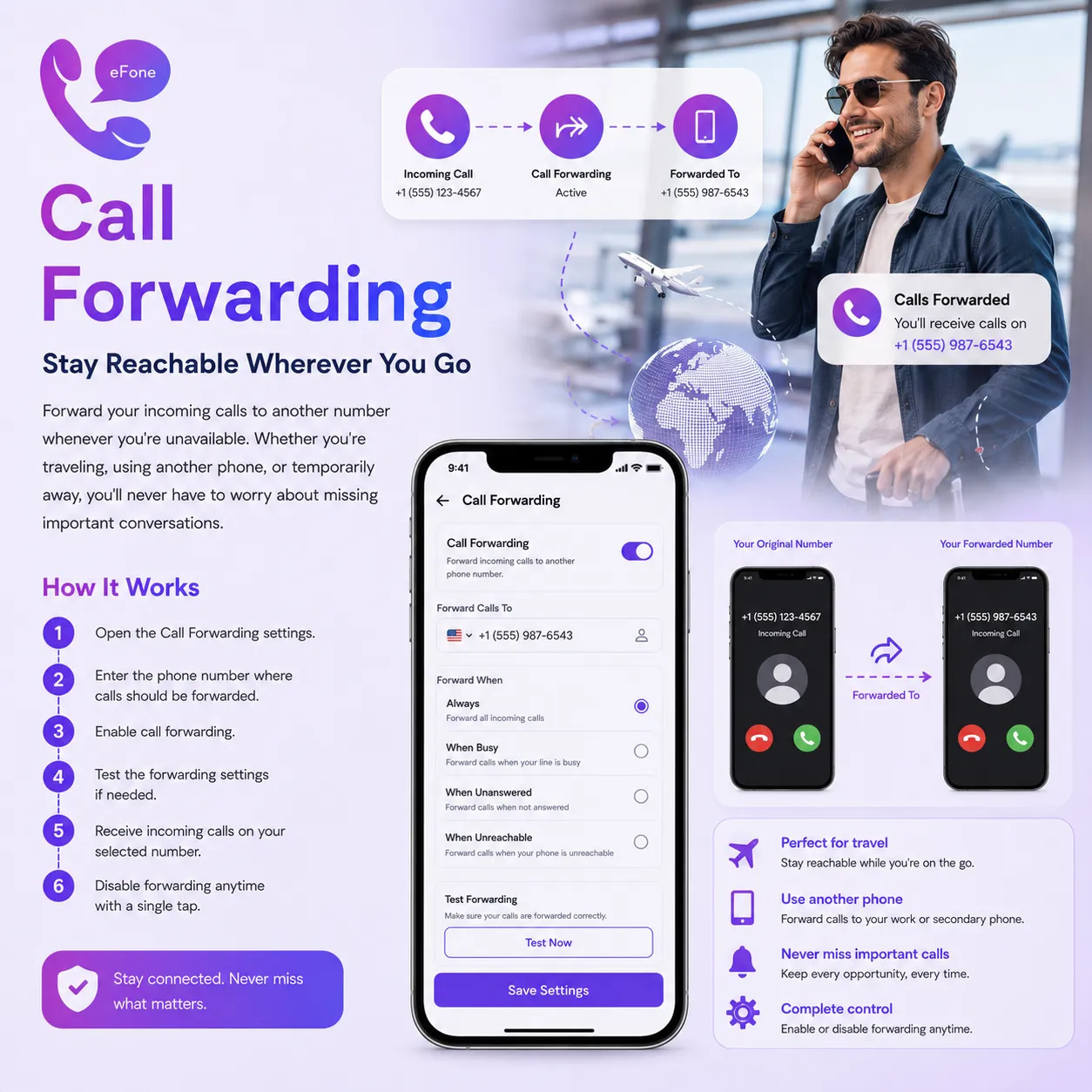
Forward your incoming calls to another number whenever you're unavailable. Whether you're traveling, using another phone, or temporarily away, you'll never have to worry about missing important conversations.
Feature Summary
Open the Call Forwarding settings. Enter the phone number where calls should be forwarded. Enable call forwarding.
How It Works
- 1
Open the Call Forwarding settings.
- 2
Enter the phone number where calls should be forwarded.
- 3
Enable call forwarding.
- 4
Test the forwarding settings if needed.
- 5
Receive incoming calls on your selected number.
- 6
Disable forwarding anytime with a single tap.
Frequently Asked Questions
What is Call Forwarding?+
Call Forwarding allows you to automatically redirect incoming calls from your eFone number to another phone number, ensuring you never miss important calls.
How do I enable Call Forwarding?+
Open the Call Forwarding settings in the eFone app, enter the phone number where you want calls to be forwarded, and turn the feature on.
Why should I use Call Forwarding?+
Call Forwarding is useful when you're traveling, using another phone, unavailable to answer calls, or simply want your calls to reach a different number.
Can I forward calls to any phone number?+
Yes. You can forward calls to supported mobile, landline, or another eFone number, depending on your plan.
Will my callers know that their call has been forwarded?+
No. The forwarding happens seamlessly, so callers experience a normal call connection.
Can I turn Call Forwarding on and off whenever I want?+
Yes. You can enable, disable, or update your forwarding number at any time directly from the eFone app.
Can I forward calls while I'm traveling?+
Yes. As long as your eFone account is active, you can forward calls to another supported number and stay connected wherever you are.
What happens if the forwarded number doesn't answer?+
The call will follow your configured call handling settings, such as going to voicemail or ending the call, depending on your eFone configuration.
Do I need an internet connection to manage Call Forwarding?+
Yes. You'll need an internet connection to configure or update your forwarding settings within the eFone app.
Will I still receive notifications for forwarded calls?+
Depending on your notification settings and forwarding configuration, eFone can notify you about forwarded or missed calls.
Can I change the forwarding number whenever I need to?+
Yes. You can update your forwarding destination at any time without affecting your eFone account or phone number.
Is Call Forwarding secure?+
Yes. Your forwarding settings are managed securely within your eFone account, giving you full control over where your incoming calls are directed.
Simple pricing — rates shown up front
Pay per user and per number, add only what you need.
Personal
+ pay-as-you-go international
- A US or Canada number from $9.99/mo, incoming calls included
- Second number & call home cheaply
- Free eFone-to-eFone calls worldwide
Purchase number
US & Canada — local, toll-free, or second line
- Pick a US or Canada number for personal use — no SIM, no contracts.
- Local, toll-free, vanity, or a second line — choose your area code.
- Port your existing US or Canada number free — keep the number you have.
Business · phone + help desk
1 free number per user
- Cloud phone + AI help desk on one account
- Extensions, routing & team inbox
- No free trial — cancel within 30 days
What's always included — at every tier
Every eFone account comes with these features from day one. No add-ons, no surprises.
Incoming US & Canada calls
Every call to your eFone number is included — no per-minute charge to answer. Outbound is pay-as-you-go at the rate shown before you dial.
Free eFone-to-eFone calls
Calls between eFone users are always free, anywhere in the world — no minutes used.
Visual voicemail
Read, replay, and manage voicemails right in the app. Voicemail-to-email also included.
Incoming SMS
Receive text messages on your eFone number. Outbound SMS is pay-as-you-go on the $9.99/mo Number plan.
Wi-Fi & data calling
High-definition calls over Wi-Fi or mobile data — no cellular minutes needed.
Caller ID — your verified number
Outgoing calls show the number you verified on your account — no spoofing, always your number.
Web phone access
Call and check messages from any browser — no install required. Included on all plans.
iOS & Android apps
Full-featured mobile apps for iOS and Android — free to download, included on every plan.
Number porting
Bring your existing number to eFone for free. Keep the number your contacts already know.
Get your US or Canada number today
Download eFone or open the web phone — for you, your family, or your whole team.